Project Phases
Understanding what each project phase requires and what 'done' looks like
Roadmap projects move through distinct phases, each with different PM responsibilities and team dynamics. I have found that teams who understand what each phase requires—and what “done” looks like for each—ship more reliably than teams who treat projects as undifferentiated work.
Project Phase Overview
Before diving into each phase, here’s the lifecycle:
| Phase | Definition | PM Focus |
|---|---|---|
| Backlog | Under consideration for upcoming roadmap | Scoping, prioritization, research |
| Planned | Committed for this quarter | PRD completion, research finalization, kickoff |
| In Progress | Active design and development work | Collaboration, decision-making, scope management |
| Pre-Launch | Cycle work complete; preparing for release | QA, documentation, GTM coordination |
| Launched | Available to some/all users | Monitoring, feedback triage, iteration |
| Done | Complete; no longer requires PM attention | Handoff to general ticket management |
Backlog Phase
The project is under consideration for work in the upcoming roadmap planning. Research happens here—before a project is committed. The PM’s job is to quantify the opportunity and build confidence that this is the right problem to solve.
PM Responsibilities in Backlog
- Build out the initial draft of the PRD (Product Requirement Doc) for this Project, with research questions, thoughts, goals, data points, competitors, etc., as a summary of key items to bring for consideration in Quarterly Planning
- Focus primarily on the Goals and showing how this project links back to the OST (Opportunity Solution Trees) in Miro for the users involved
- Coordinate Assumption Testing early with UXR as needed to validate before major investment of resources
- Quantify the problems: talk to users, look at the data, study user sessions, etc., to determine what should be planned further
Research vs. Project
A common confusion: I think it’s easiest to think of research not as a phase within a project—it’s what happens before a project exists.
Scoping documents capture the PM’s exploration of a strategic area:
- What customer problems exist in this space?
- How significant is the opportunity?
- What approaches might work?
- How does solving this advance company strategy?
These scoping documents often spawn multiple projects. A single research effort into “improving onboarding” might result in three separate roadmap projects, each with distinct objectives and timelines.
From Scoping to PRD
When an opportunity is well-understood enough to commit resources, create a focused PRD for the specific project.
Critical distinction:
| Document | What It Is | Where It Lives | Who Uses It |
|---|---|---|---|
| Scoping/Research Doc | Higher-level initiative container | Executive planning; NOT on team roadmap | Leadership, PM planning |
| PRD | The actual roadmap project | Team roadmap with statuses | Trio, team, stakeholders |
The scoping doc is strategic context—it captures the PM’s exploration of an opportunity and often spawns multiple PRDs. But the scoping doc is not a project. It doesn’t have statuses like Backlog → Planned → In Progress.
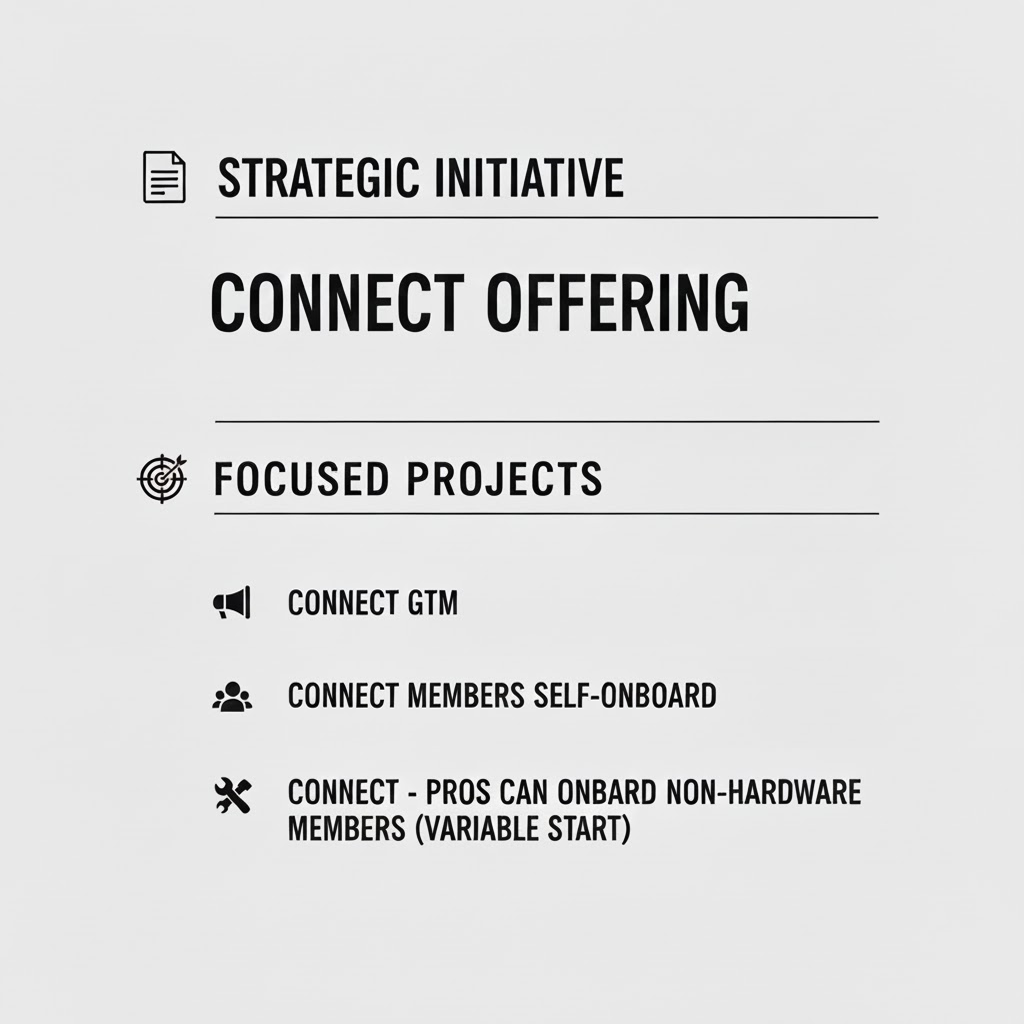
Strategic initiative spawning multiple roadmap projects
The PRD is the roadmap project. It has:
- Specific, clear objectives
- Time-bound scope
- Project statuses that track progress
- A trio accountable for delivery
PRDs link back to the scoping document for context, but someone working on the project day-to-day reads the PRD. The scoping doc is for understanding the strategic picture—useful in executive shareouts, referenced when questions arise about “why are we doing this?”
When Research Happens
Research isn’t only a phase—it happens continuously. But there are moments when research intensity increases:
Annual/semi-annual strategic research:
- Part of your annual strategy process
- Identify areas to dig into this year or next
- Build confidence in overall market strategy
Pre-project research (Backlog phase):
- Quantify specific opportunity
- Understand user journey in detail
- Form hypothesis on best approach
Ongoing research:
- Inform projects throughout their lifecycle
- Validate assumptions as you learn
- Adapt based on new information
The initial research phase is about building enough confidence to commit. You’re not trying to answer every question—you’re trying to know enough to scope a project and define its success criteria.
Exit Criteria for Backlog Phase
How do you know when research is “enough” to move to Planned?
I have found these signals indicate readiness:
- You can articulate the customer problem clearly
- You understand how solving it affects the broader company strategy
- You have a hypothesis on the best approach (not certainty—a hypothesis)
- You can define an outcome that would indicate success
- You can scope the work to a reasonable timeline
If you can’t do these things, keep researching. If you can, move to PRD and get the project on the roadmap.
Research Driven by Leadership
In the real world, research priorities are sometimes dictated by company leadership. A stakeholder asks: “Should we build X?” The PM needs data to inform that discussion.
This is legitimate. Research serves strategy, and strategy involves stakeholder input. The discipline is ensuring research still follows rigorous methods even when the topic is assigned rather than discovered.
Planned Phase
The project has been accepted into the plan for work this Quarter. The PM finalizes the PRD, coordinates with the team, and prepares for cycle kickoff.
PM Responsibilities in Planned
- Build an updated, comprehensive PRD for the project in Notion, linking the relevant files and features, so it is ready for the cycle
- The PRD should be something that is very much alive and has research questions and thoughts in there, or data points, or competitor info
- Set up Kickoff to meet with the team and stakeholders as the project begins
- Coordinate with the Project lead to link your Notion PRD to their Linear project, and review their project summary
- If the development portion of the project is small, create the “Improvement” ticket(s) and bring them for consideration to the cycle planning
- Identify an existing project Slack channel or create one for your project team
PRD as Living Document
The PRD isn’t a spec you write once and forget. During the Planned phase, it should be actively maintained with:
- Research questions still being explored
- Emerging insights from user conversations
- Competitive intelligence updates
- Technical constraints discovered during scoping
- Stakeholder input from kickoff discussions
Kickoff Coordination
Before the cycle begins, align the team:
| Kickoff Element | Purpose |
|---|---|
| Problem review | Ensure trio understands the customer problem |
| Success criteria | Align on how we’ll know if we succeeded |
| Scope boundaries | Clarify what’s in and out for this cycle |
| Dependencies | Surface blockers early |
| Stakeholder expectations | Set appropriate expectations with interested parties |
Exit Criteria for Planned Phase
The project is ready to move to In Progress when:
- PRD is comprehensive and linked to Linear project
- Team has been kicked off and understands objectives
- Slack channel exists for project communication
- Success metrics are defined
- Stakeholders have been informed
In Progress Phase
A cycle for the design or development work on the project has begun. The PM shifts from defining the problem to collaborating on the solution and ensuring efficient execution.
PM Responsibilities in In Progress
- Ensure design and development resources are moving efficiently through the project and that the project team has properly defined their objectives
- Coordinate User Testing with UXR for design prototypes as needed to check for usability issues (not every project needs testing)
- Review and ensure the project goals are achieved in the Design
- Capture project decisions as comments in the Notion roadmap project and keep your PRD up to date
- Ensure that the project team includes the correct stakeholders when appropriate
- Ensure that all measurement metrics are in place and are accurate, linking to existing metric dashboards or commissioning new ones
- Test the developed application to verify that the main goals are completed before the end of the cycle
Design Collaboration
Once a project is in progress, design often takes the lead on solution exploration. The PM’s role shifts from defining the problem to collaborating on the solution.
The dynamic should be:
Designer leads: Sets meetings to share and discuss design choices with PM and lead dev. Owns the UX decisions.
PM contributes: Provides feedback, raises concerns, connects designs to customer needs and business requirements.
Collaboration, not handoff: The phases overlap; PM and Design tag-team where there’s natural intersection.
Giving Design Feedback
How PMs frame feedback matters enormously.
Problematic framing:
- “You should do it this way”
- “Change this button to…”
- “I don’t like this layout”
Productive framing:
- “I’m not sure this solves the problem of…”
- “When I look at this, I worry users might…”
- “The research showed users expect X—how does this address that?”
Good PMs structure ideas as suggestions with clear reasoning, driving back to user input as much as possible. The goal is to raise concerns, not dictate solutions. If you’ve hired a good designer, let them design.
Healthy Overlap
Research → Design → Engineering aren’t clean handoffs. They blur.
- PM continues researching during design (validating assumptions, testing concepts)
- Design continues during engineering (refining details, handling edge cases)
- Engineering provides input during design (technical constraints, opportunities)
Foster this overlap. The alternative—rigid phase gates with formal handoffs—creates information loss and slows everything down.
The discipline is ensuring accountability remains clear even as work overlaps. PM and Design both ensure results meet their standards:
| Role | Ensures |
|---|---|
| PM | Solution addresses the defined problem; aligns with business requirements |
| Design | Solution is usable, coherent, and meets UX standards |
| Dev | Solution is technically sound and buildable |
Company-Level Working Agreements
Teams function best when there are clear working relationships defined between departments. What does healthy PM-Design collaboration look like at this company? Who makes which decisions? How is feedback given?
These agreements reduce friction by setting expectations. They don’t need to be bureaucratic—a shared understanding documented somewhere is enough. But without them, each project reinvents the collaboration model.
Engineering Collaboration
Once engineering is building, the PM shifts to supporting rapid, informed decision-making while the team delivers.
Daily Rhythm:
A healthy sprint cycle includes:
Daily standups: Quick check-ins to identify blockers and set up sync times. Not status reports—problem-solving sessions.
Frequent sharing: Devs share work early and often during the two weeks. Not waiting until the end to reveal what they’ve built.
On-the-fly decisions: PM, Design, and Dev make decisions together as questions arise. Not everything needs a meeting.
Sprint demos: After the cycle, demonstrate completed work to stakeholders. Pick up lingering items that need cleanup before release.
The goal: by the end of the sprint, the happy path is working. Edge cases and polish might continue, but the core functionality is complete.
Handling Scope Questions
Mid-build discoveries are inevitable. “This is harder than expected.” “We found a dependency we didn’t know about.” “Should we cut X to hit the timeline?”
I have found that keeping a Now / Next / Later list on active projects helps the team adapt:
| Category | Contains |
|---|---|
| Now | What we’re building this cycle |
| Next | What’s queued for the following cycle |
| Later | Ideas and improvements for future consideration |
When new information emerges, the trio regroups:
- Does this change what’s in “Now”?
- Should something move to “Next” or “Later”?
- How do we still achieve the outcome given this reality?
The key principle: The goal of the cycle is to deliver an outcome, not to stick doggedly to a plan made before new information arrived. The trio adapts to reality together.
This isn’t scope creep or planning failure—it’s learning. The two-week cycle exists precisely because you can’t predict everything. Adaptation is the feature, not the bug.
PM Involvement During Build
The PM stays engaged but doesn’t micromanage:
| Activity | PM Role |
|---|---|
| Technical decisions | Available for context; doesn’t dictate |
| Scope questions | Active participant in tradeoff discussions |
| Blockers | Helps clear organizational obstacles |
| Customer questions | Provides input or arranges quick research |
| Demo prep | Ensures stakeholder communication is ready |
The engineering lead owns the build. The PM ensures the build stays connected to customer needs and business objectives.
Exit Criteria for In Progress Phase
The project is ready to move to Pre-Launch when:
- Happy path is complete and working
- PM has tested that main goals are achieved
- Metrics tracking is in place and verified
- PRD is updated with decisions made during the cycle
- Team confirms readiness for QA
Pre-Launch Phase
The work from the cycle is complete, and we are ensuring we are ready for release. The PM coordinates across functions to ensure a smooth transition to production.
PM Responsibilities in Pre-Launch
- Record internal Demo video for the internal project release notes
- Review any items coming back from the QA Report with the project team to ensure there are no issues blocking release
- Oversee the Help Center Documentation creation or updates to the features that your project affects
Prelaunch Activities
Before going live:
| Activity | Owner | Purpose |
|---|---|---|
| QA review | QA / Dev | Catch critical bugs |
| Documentation updates | PM / CS | Prepare support teams |
| Stakeholder communication | PM | Set expectations, announce changes |
| GTM execution | PM / Marketing | Customer-facing announcements |
| User test setup | PM / UXR | Recruit participants, prepare test scripts |
| Monitoring setup | PM / Dev | Ensure analytics and alerts are ready |
| Demo video | PM | Internal release notes |
| Final trio review | Trio | Confirm readiness |
The pre-launch phase is typically brief—a week or less. The goal is ensuring readiness, not extended polishing.
Don’t skip monitoring setup. Before launch, confirm:
- Are the right events being tracked?
- Do you have dashboards to watch key metrics?
- Are alerts configured for critical failures?
- Can you measure the outcome you defined in the PRD?
If you can’t measure it, you can’t know if you succeeded.
Go/No-Go Decision
Who decides when something goes live?
The trio all weigh in. Typically, Dev and PM both need to agree before pushing to production.
In mature teams, Dev owns the release timing. Once the agreed items are complete, they take responsibility for pushing. This fosters accountability and reduces friction—no waiting for PM approval on purely technical readiness.
The specifics depend on release criticality and company context. But the principle holds: continuous delivery, even with some risk of bugs. You have processes to catch and fix issues. Don’t let releases build up. Release small and often.
Exit Criteria for Pre-Launch Phase
The project is ready to move to Launched when:
- QA report shows no blocking issues
- Demo video is recorded
- Help Center documentation is updated
- Trio confirms readiness for release
Goal: Move from staging to production within a week if possible. Don’t let “pre-launch” become an indefinite holding pattern.
Launched Phase
The updates from the project are now available to users. The PM shifts to monitoring outcomes and making rapid decisions based on real-world feedback.
PM Responsibilities in Launched
- Look at sessions, watch support tickets, etc., for insights on what is working or isn’t, to make decisions quickly
- Report out on usage for the Feature—after first month, 3 months, etc.
- Request support from marketing, PSMs, or Member Support to help any fledgling numbers
- Collect any Technical Documentation needed for the application
- Update any Feature Documentation in Notion affected by your release
- Make decisions for follow-on projects based on the user reception of the current project
Launch Week Activities
During the launch period:
Active triage: Feedback comes in fast. Triage it the same way as during the cycle—immediate fixes vs. backlog items vs. icebox.
Bug response: Critical bugs get immediate attention. The team is on heightened alert.
Stakeholder updates: Keep stakeholders informed of what’s live and any issues encountered.
Post-Launch Monitoring
After launch, you’re validating that the changes work as intended and achieving the outcomes you defined.
Active validation activities:
| Activity | Timing | Purpose |
|---|---|---|
| Run user tests | First 1-2 weeks | Watch real users interact with changes; catch UX issues |
| Review metrics daily | First week | Spot anomalies early; confirm tracking works |
| Review metrics weekly | Weeks 2-8 | Track trend toward outcome; identify patterns |
| Gather qualitative feedback | Ongoing | Understand the “why” behind the numbers |
| Usage report-out | 1 month, 3 months | Share results with stakeholders |
What to watch:
- Are the metrics moving as expected?
- Is the user story actually improving?
- Is the business getting what it needs from this improvement?
- What feedback is coming in from users?
- Do user tests reveal friction you didn’t anticipate?
Timeline: Give it a month or two. Metrics need time to stabilize; users need time to encounter the changes.
Shareout: Close the loop with stakeholders. Even if you met your outcomes, report back. This builds trust and demonstrates that the team delivers on commitments.
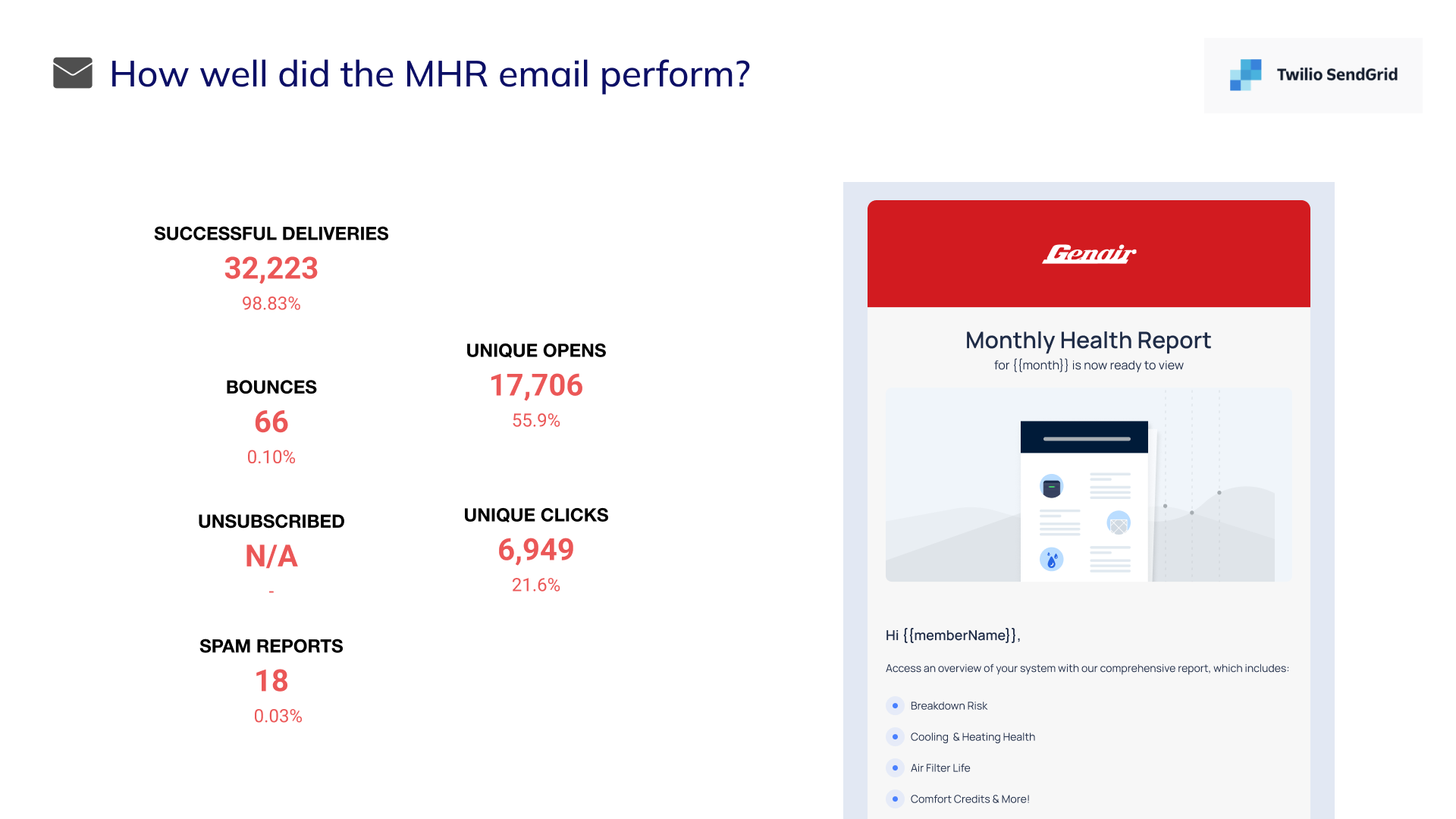
Reporting on campaign success
Iteration Signals
How do you know if you need to iterate?
Go back to the outcome you were aiming for:
- Outcome met: Document success, share learnings, move on
- Outcome partially met: Create small tickets to close gaps, monitor further
- Outcome not met: Investigate why. Consider a follow-on roadmap project if the opportunity is still significant
The signal isn’t “users are complaining” or “it feels incomplete.” The signal is: did the user story improve, and did the business get what it needed? If yes, you’re done. If no, figure out why and decide whether further investment is warranted.
Exit Criteria for Launched Phase
The project is ready to move to Done when:
- Outcome has been evaluated (met, partially met, or not met)
- Usage has been reported out to stakeholders
- Follow-on decisions have been made
- Feature documentation is complete
Done Phase
The project will no longer require dedicated PM attention. It becomes part of the product, managed through standard processes.
Definition of Done
The project reaches Done status when:
- Performing well (showing good numbers) and can now be managed generally as part of the whole application
- Another project is underway for the next steps from the learning on this project
- The project is abandoned and will no longer be supported
What “Done” Means
A project reaches “Done” status when:
- The outcome has been evaluated (met, partially met, or not met)
- Learnings have been documented and shared
- Any follow-on work has been captured (small tickets or new roadmap project)
- The feature can be managed through general metrics and ticket processes
At this point, turn your attention to other projects. This one no longer needs dedicated PM focus—it’s part of the product now, monitored through standard reporting.
Summary: Project Phase Principles
| Phase | PM Focus | Exit Criteria |
|---|---|---|
| Backlog | Research, quantify opportunity, build confidence | Can articulate problem, hypothesis, and success criteria; initial PRD drafted |
| Planned | Finalize PRD, kickoff team, prepare for cycle | PRD comprehensive; team aligned; Slack channel exists |
| In Progress | Collaborate on solution, manage scope, ensure metrics | Happy path complete; metrics in place; goals verified |
| Pre-Launch | QA coordination, documentation, demo video | No blocking issues; docs updated; trio confirms readiness |
| Launched | Monitor outcomes, triage feedback, report usage | Outcomes evaluated; usage reported; follow-on decisions made |
| Done | Hand off to standard processes | Feature managed through general metrics and tickets |
Projects aren’t just “in progress” or “shipped.” Understanding the distinct phases—and what each requires—helps teams move efficiently from opportunity to outcome.